Microsoft Excel Find Next Value Change in Column Macro
I find that if I’m working with data from a SQL query it is easier to manipulate, sort, and filter that data in Excel than it is in the SQL query itself. I am also a fan of using Excel as a Data Visualization/Reporting tool. Because of these two things I tend to work in Excel quite a bit and have developed a few macros to help make my life easier.
Many times when you are working with data from a SQL query and you sort on a “dimension” column (example below) you will have many repeated values in a single column. If you want to page through the data and find when the values changes from one to the next, Excel does not have the built in ability to do this. However the Macro to perform this function is pretty easy to write.
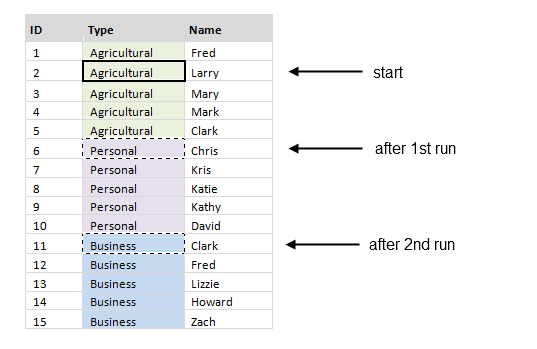
In the image below the data was sorted on the “Type” column. If cell B3 is selected and the FindNextValueChangeInColumn macro is run, cell B7 would be selected. If it is run a second time cell B12 would be selected and so on.
-Aaron
Many times when you are working with data from a SQL query and you sort on a “dimension” column (example below) you will have many repeated values in a single column. If you want to page through the data and find when the values changes from one to the next, Excel does not have the built in ability to do this. However the Macro to perform this function is pretty easy to write.
In the image below the data was sorted on the “Type” column. If cell B3 is selected and the FindNextValueChangeInColumn macro is run, cell B7 would be selected. If it is run a second time cell B12 would be selected and so on.
Here are the Macros to copy and paste into an Excel VBA Module:
https://gist.github.com/aaronhoffman/5c465e2500190454dfd6c97a1ec1e0a5
Hope this saves you some time!https://gist.github.com/aaronhoffman/5c465e2500190454dfd6c97a1ec1e0a5
-Aaron


Comments