Posts

Microsoft Excel Find Next Value Change in Column Macro
Image
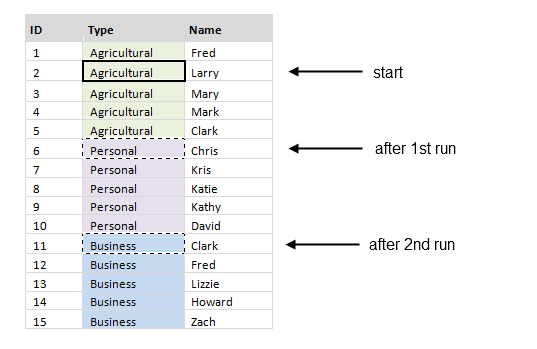
I find that if I’m working with data from a SQL query it is easier to manipulate, sort, and filter that data in Excel than it is in the SQL query itself.  I am also a fan of using Excel as a Data Visualization/Reporting tool.  Because of these two things I tend to work in Excel quite a bit and have developed a few macros to help make my life easier. Many times when you are working with data from a SQL query and you sort on a “dimension” column (example below) you will have many repeated values in a single column.  If you want to page through the data and find when the values changes from one to the next, Excel does not have the built in ability to do this.  However the Macro to perform this function is pretty easy to write. In the image below the data was sorted on the “Type” column.  If cell B3 is selected and the FindNextValueChangeInColumn macro is run, cell B7 would be selected.  If it is run a second time cell B12 would be selected and so on. ...

Visual Studio Code Snippet for a Notify Property (INotifyPropertyChanged)

Image
updated version can be found here:  https://aaron-hoffman.blogspot.com/2017/12/vs2017-visual-studio-2017-code-snippet-wpf-inotifypropertychanged.html In the ViewModel classes of projects following the M-V-VM pattern it is often necessary to raise a "PropertyChanged" event (to assist with INotifyPropertyChanged interface implementation) from within a property's setter.  This is a tedious task that will hopefully someday be solved by using the Compiler as a Service...  But until that day comes, I've created a handy Visual Studio Code Snippet for myself to help automate this task.  The XML for the code snippet, and an example of the code it produces are below (note the Base Class and the OnPropertyChanged() method call).  Continue reading to see how to "install" and implement this snippet. -------- <? xml version = " 1.0 " encoding = " utf-8 " ?> < CodeSnippets xmlns = " http://schemas.microsoft.com/VisualSt...